Autopilot: Unattended Work
Most coding agents like Claude Code or Codex can be set a task, but require supervision. Either you vibe-code it -- accept what it did without checking -- or you keep an eye on its thinking as it works, and review its code changes. For short tasks this is often not a problem. For long-running tasks that require attention and focus over long periods -- over lunch to overnight -- it is.
There are several common symptoms in other agents:
-
The AI loses track of the goal ('drift');
-
The AI knows your goal, but decides on an alternate solution different than the one you asked for, one that it thinks is okay or acceptable despite your wishes but which you, when you see it, disagree with;
-
The AI ignores some key element of what it was told, some key requirement or spec item;
-
Code is not 'ready' once written; it has architectural issues, style issues, or foreseeable bugs.
CodeBot is designed to reduce these situations. That is, it is designed from experience with other coding agents so that these situations are less likely to occur in normal work, but for long-running work it has a special mode to reduce these risks further.
This is through a fairly unique feature, which we call Autopilot.
Autopilot is an 'unattended mode', where you are not expected to be present, yet where we aim to provide high quality output of the same sort as if you had been present and giving feedback to CodeBot.
Using Autopilot
Enabling Autopilot means that once work starts, you do not need to be present at the computer -- you do not need to constantly monitor the AI's work for the above problems.
To enable Autopilot, click the Autopilot button at the bottom of the chat. This lets you select Attended (ie you are assumed to be present, can be asked questions, etc) or Autopilot mode.
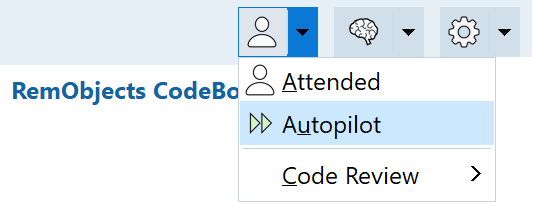
Autopilot does not mean you can just type something and walk away immediately. You can only do that once coding begins. Autopilot means that:
-
Work requests will always enter Plan mode
-
CodeBot will identify all requirements and work out a plan, and confirm it with you
-
Once confirmed -- once CodeBot has your okay -- you can walk away and leave CodeBot to do it.
Code Review in Autopilot
CodeBot segments its work, and does each plan item as a discrete step. This helps prevent 'drift': no single work item is large enough to overwhelm context or memory. Each new step is begun anew, but with full information about what was done for previous steps.
Often this is enough to achieve targeted and focused work over long runtimes, ie, it addresses problem #1 above. The work is done -- with the goal retained -- but in other ways not specifically checked beyond the AI itself asserting it is okay.
However, you can use Autopilot with Code Review.
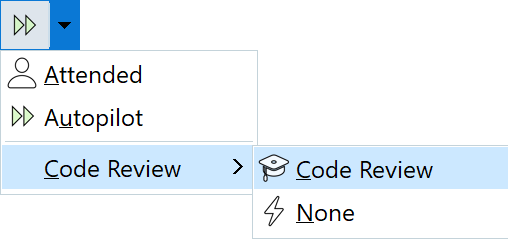
Enabling Code Review means that after each step is complete, the work is checked by two other separate agents. Their goal is to act in your place, checking that the code does what you asked for. This is intended to address the remaining problems: #2 (choosing something you did not approve); #3 (ignoring a key part of the input); and #4 (architectural issues or foreseeable bugs).
How Autopilot Works
Simple Autopilot
Autopilot segments its work by plan step, ensuring that any individual work is small and remains focused.
Autopilot with Code Review
The Code Review version runs two additional agents after each coding segment is complete. Their job is to check the work against what you asked for. This technique is sometimes known as 'adversarial agents': we dislike that because they're not adversaries; the analogy is more like code review within a team. A human code reviewer can give clear feedback that must be taken on board, but it is done so with a shared and common goal of the quality of the outcome. CodeBot's Autopilot Review is the same.
The two agents:
-
Check goal alignment. Is the delivered step aligned with furthering your goal, and aligns with your input and approved implementation, or guidelines / restrictions you communicated? This step does not look at code quality: it looks at how well it contributes to the work and how well it progresses the work forward for what you asked for.
-
Code review. This is the same as a human code review: check code quality, architecture, style, look for potential bugs, etc
Work done in Autopilot is slower than normal AI coding, because it partitions into discrete steps and because other agents review before it can continue. However, this speed decrease is intended as a worthwhile tradeoff for what it gains you.
As a reality check, Autopilot is not a panacea. Just as multiple humans (developer and code reviewing colleague) may still produce code that is mergeable and approved, yet later needs further work, so can CodeBot. Nor does it guarantee absence of bugs: nothing can guarantee that, and an AI is very human-like in its understanding and fallibility. Instead, Autopilot is intended to give you confidence that a system for high quality output is running and you do not need to constantly watch what the AI is doing: you can leave it unattended.