CodeBot for Delphi

CodeBot for Delphi is a fully agentic coding AI, with specific Delphi support including expertise in Delphi coding, knowledge of Delphi libraries, working in the form designer, and more. CodeBot helps Delphi developers understand code, ask questions, review changes, and move work forward with AI assistance.
Getting Started
-
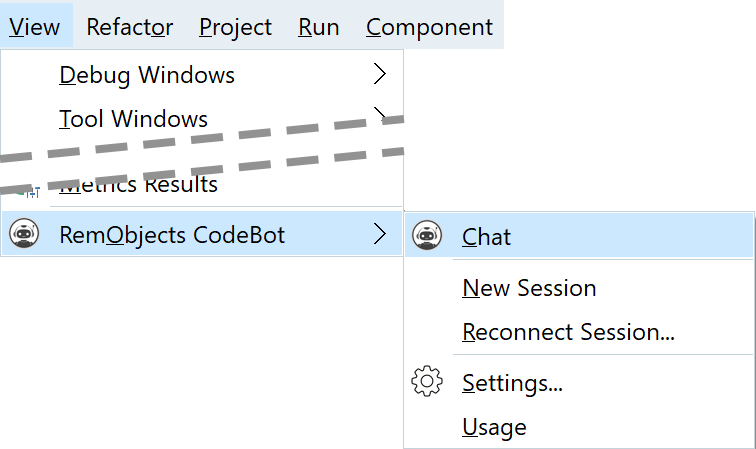
Click the IDE's View menu > RemObjects CodeBot > Chat
-
Dock the CodeBot window left or right
-
On the IDE title bar > save Desktop button > click it and save
That's it. Start writing to CodeBot!
Or read on for more detail.
Where to Start
-
If you want a code-safe first walkthrough, start with Your First 15 Minutes with CodeBot.
-
If you already use tools such as Claude Code or Codex, see Coming From Other Coding AIs.
-
If you are cautious about AI editing code, see Adopting CodeBot Safely.
-
If you are introducing CodeBot to a team, see Using CodeBot on a Team.
-
If you want examples of how CodeBot can be used well, see Common Workflows and read the Best Practices.
-
If you want CodeBot to complete code directly at the editor caret, see AI Code Completion.
-
If you just want examples of what to type, see the Prompt Cookbook.
-
If you are a manager, team lead, or purchaser, see CodeBot for Managers and Purchasers.
Showing CodeBot
After installing, open a project and go to the View menu, RemObjects CodeBot > Chat. This opens CodeBot. (The first time, you may be prompted to log in to your RemObjects account.)
We recommend docking CodeBot to one side of your IDE. Then save your desktop via the button on the IDE title bar:

This ensures it re-appears next time.
Writing to CodeBot
Now, simply type something in the chat:
What does this project do?
Press Enter or click Send.
Commands can be complex or involve multiple steps and logic, including things CodeBot needs to analyse:
Add a new tab control to this dialog, which contains all my settings. I want them organised on a page per logical group - figure out what seems reasonable. Make sure the dialog can be canceled without actually applying any changes.
Or you can discuss approaches with it, or ask for its help:
I need to add a new [your feature here] but I'm not sure of the best way. Should I [something] or [something else], or do you have any other suggestions?
or,
When the app renders this data it is really slow, why?
Or ask it to plan something out:
I need to add support for HTTPS to our networking. What's involved? Create a plan to implement this.
(It will research and plan out what to do, discuss this with you, and then if you allow, implement it.)
You can:
- Add new features, or modify existing ones
- Add or change your user interface (both VCL and FMX)
- Create complete projects, forms, frames, data modules, and other modules
- Complete code directly in the source editor
- Find the cause of bugs, crashes, or performance issues
- Fix a bug
- Solve failing tests
- Add tests
- Use source control
- Review code
and more. Read about common workflows.
 If CodeBot ever has any trouble, turn the intelligence up by clicking the brain icon at the bottom of the chat window.
See Choosing Intelligence for more, including when to use which level of intelligence.
See Best Practices for more info about the best ways to work with CodeBot.
CodeBot is a highly capable agent, along the lines of Claude Code and Codex. If you are used to using coding AIs, simply type in the chat and start using it! Otherwise, read on for more.