Choosing Intelligence
CodeBot offers multiple levels of intelligence (corresponding to different AI models under the hood.)
A higher intelligence costs more. Therefore, it is more cost-effective to use a lower intelligence level when the task is easy.
Equally, if CodeBot is struggling, it is more efficient to increase its intelligence (a) to get the job done or (b) to get it done faster.
You can change CodeBot's intelligence via the  brain icon button.

CodeBot has three levels:
-
Light: this is for easy, simple tasks
-
Standard: good for normal coding
-
Max: for hard tasks, including puzzling out logic
As an example of the various levels, we have used an app that generates and renders mazes for many screenshots in this doc. This requires a sound knowledge of computer science for the algorithms and a maze data structure; of architecture to clearly separate the data, the forms, and the algorithms including from each other and from the underlying maze data representation; of visual form design; etc. It's a decent small but real-world app.
For this app:
-
Light was fine to create the application: main form, settings dialog, a maze data structure, a standard but simple maze generation algorithm. It made a perfectly fine version 1.
-
Standard provided good suggestions and discussion around unusual maze generation algorithms, and implementing some of the more unusual ones.
-
Max was used when creating an entirely new algorithm that no-one had developed before, from a very vague idea through multiple iterations as CodeBot and I puzzled out a new approach together, saw its results, and reworked.
You'll notice Standard was good for exploration and ideas, including computer science related, but Max was used for deeper thinking including solving difficult problems.
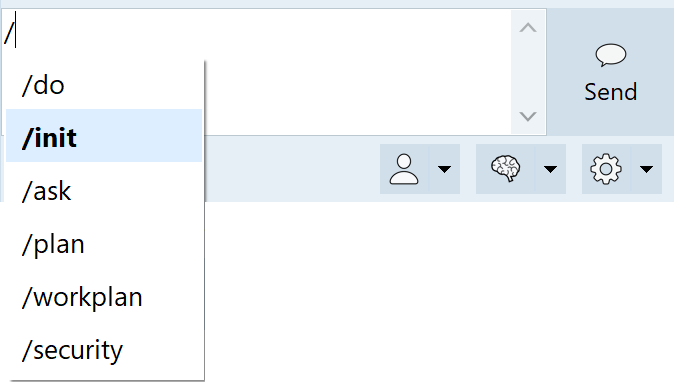
/ at the start of a message to see it.
CodeBot has also sometimes been used to develop itself, specifically parts of the Delphi CodeBot plugin. One example is slash-command completion. The chat input is a custom TMemo descendant control with an automatic popup window, which updates and filters as you type, allows you to select with keyboard and mouse, and inserts the result in the memo text.
-
Standard built the control including its popup. We had to specify a few changes, such as the selection colour and adjusting the width for the text when highlighted in bold (wider) rather than just the width of the widest string.
-
Max was used for solving a hard bug: selecting and inserting text was async via Windows messages, at one point freed the popup control, and our code inserting text also changed memo scrollbar visibility - which could recreate the window handle in the middle of doing something. This led to insertion not working or, worst case, the occasional freeze. Thus solving an only-sometimes-reproducible bug involved puzzling out the order of async (main thread, message-based) processing and side effects of apparently innocuous property changes.
We recommend Max for work where CodeBot needs to understand cause and effect, or research, such as finding the causes of bugs.
It's also useful for more complex or nuanced coding, say for interactions between synchronous and asynchronous code or events, including threading, locks, etc. Essentially, use Max for anything that involves reasoning about a situation requiring a complex internal mental model -- anything that a human would also need to think deeply about.
Reasoning
The intelligence menu also allows you to set reasoning:
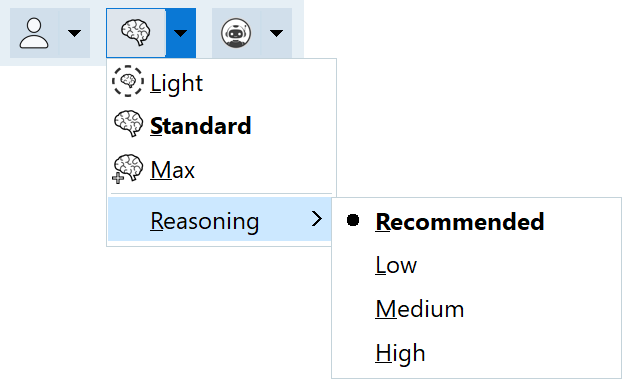
Reasoning is the amount of thinking CodeBot does. Less thinking is faster, but it may not understand or 'think through' as well. More thinking is slower, but more likely to give good results. It is more expensive, but only slightly (less so than turning up the intelligence level.)
In general, leave this on Recommended, which usually approximately corresponds to Medium (approximately; we tune this under the hood.) If you feel CodeBot is almost but not quite there, one option to try before increasing the intelligence level is to turn up the reasoning, eg to High.