Learning Your Codebase
CodeBot can achieve a great deal just by being smart and when it's not sure, searching/grepping to find potentially relevant code. However, CodeBot is best when it learns your codebase the way a developer who's joined your team would.
A new developer usually does two things:
-
Onboarding: an initial set of information
-
Learning on the go: while working, their understanding increases. Interesting things are remembered. A sense of the code and structure builds up over time.
CodeBot works just the same.
Onboarding
Onboarding -- 'initialisation' -- gives CodeBot a high-level understanding your project.
To do this, run the /init command. This will get CodeBot to look for things it thinks it needs to know about your codebase, and it will then write them down and save them in a file called agents.md.
CodeBot may ask you questions as it goes.
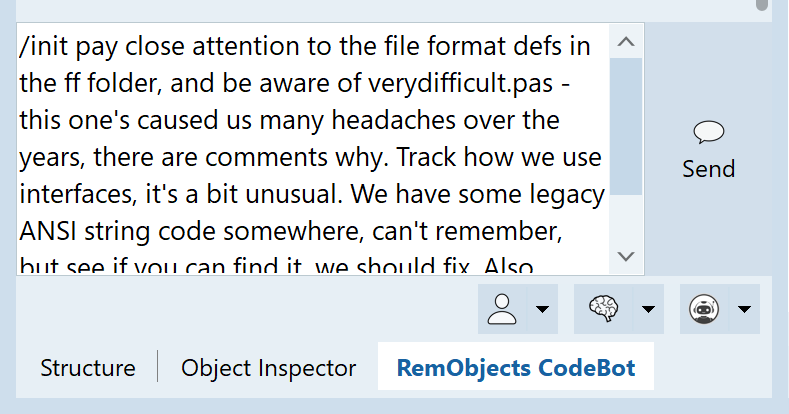
/init (which you can), but giving it starting info as well. You can see the dev running this prompt is describing a real-world, slightly messy state.
Running just /init is fine. You can help the process by writing key things in the message already: /init (write important things here) or simply by writing to CodeBot as it's working.
The init process can take ten or more minutes. You usually do it only once.
CodeBot will learn more as you use it: this is a kick-start, a starting point.
The agents.md file this creates or edits is a general knowledgebase about working in your project.
You can and should both edit it yourself plus keep it in source control.
Learning On The Go
CodeBot can add to this file at any time. It may ask you when it spots something it thinks should be remembered, or you can tell it to save something:
Yes, we always implement all interfaces via the implements keyword. Save this to your agents.md!
Over time, both CodeBot-identified items combined with anything you instruct will add up, and your agents.md file will capture more and more of the key things to know in order to work well with your code.
Personal Preferences
All the above is stored in a file named agents.md located in your codebase/repo. We recommend checking it in to source control, so as one developer adds something, other developers' CodeBots get it too. It's a plain text (Markdown) file; edit it however you wish.
However often there are preferences in working style that are not team-wide, but individual. CodeBot can learn these too, with a personal agents.md. You can find it in %APPDATA%\RemObjects Software\CodeBot\agents.md, or create it if it doesn't exist.
This one is private between you and CodeBot. Write anything in it that is not a team rule or guideline, but is how you want CodeBot to behave, or things you want it to remember, or any other info that is useful to help CodeBot work with you as you wish.
CodeBot can also add to this personal agents file.
Project vs Personal agents.md
-
Project / repo
agents.md: commit to source control, shared with your team, contains knowledge about the project and its code, how you want it to understand and write code, team practices: everything that is project-wide and team-wide. -
Personal
agents.md: only on your computer, add in your personal preferences and workflows, customise CodeBot to work your way.
You can also edit repository and personal agents files from Settings.