Permissions and Security
CodeBot tries to provide a safe and intuitive middle ground between the two most common AI permission models: asking for everything, or allowing everything. Instead, system access is gated to your project, and within that, CodeBot can read and write files freely.
File access security
CodeBot's file permissions model is that if you are running CodeBot, you want it to be able to read your project files and write (create, edit, modify, etc.) Otherwise, CodeBot can't achieve much.
Those who are new to using AIs sometimes feel uncertain allowing an AI to edit code. CodeBot's edits are always shown as diffs in the Chat view. We also encourage you, if you feel worried, to use source control: this is best practice so that if CodeBot ever makes any edits you don't like, you can revert.
Restricted locations
CodeBot restricts file system access to where it believes your project and source code lives. It finds the common root folder of your project files and source code. If some folders look like outliers (a heuristic), they do not contribute to finding that root but are regarded as extra locations.
The result of this is termed the 'workspace' and is printed at the top of each session:
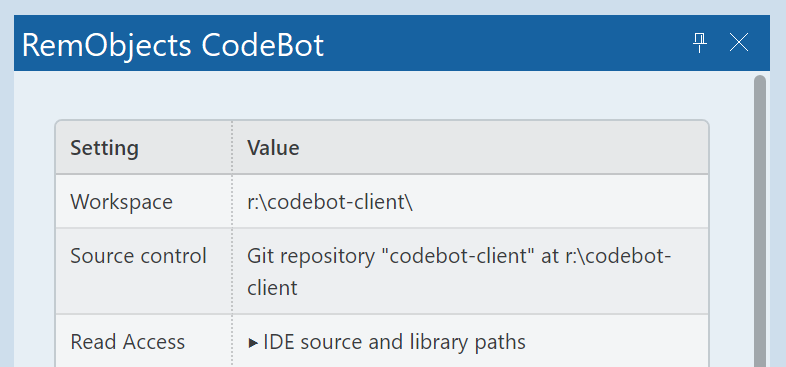
In this example, which is for the CodeBot plugin itself, there are source and project files inside both:
R:\codebot-client\Source(main source, main project file, project group file)R:\codebot-client\Tests(multiple test projects and their source)
The common root of these two folders -- the workspace -- is:
R:\codebot-client
This is shown above as the 'workspace'. CodeBot can access files within this folder and subfolders. This means read and write access. If there were any other folders CodeBot had identified as being key to your project and that it will be able to read and write to, they too would be listed here.
CodeBot's AI cannot read or write outside these locations.
(The sole exception is your personal agents.md, which CodeBot allows special access to.)
In other words:
-
Listed as in the screenshot above: CodeBot can read or write
-
Anywhere and everywhere else: CodeBot cannot access.
Installed Libraries or Components
CodeBot can also see the library and source paths your IDE is configured with, which includes your installed components. CodeBot has read-only access to these folders. It cannot modify them or their contents.
In the above screenshot you can see these labeled as 'Read Access'; in CodeBot, you can click to expand see the exact list.
Reading your installed libraries, whether the default VCL/FMX or any other components, can be highly useful for understanding their behaviour, diagnosing bugs, and writing code that matches their APIs and expected behaviour exactly.
Try this out
Ask CodeBot,
Explain how a VCL button click works, in detail. How does it get from Windows and the mouse to an event handler? Quote any interesting code.
It will look up the whole flow from Windows message through to event handler.
Tip: 'Quote interesting code' is a tip to get CodeBot to not just tell you, but to show you; this also ensures it looks at the code rather than answering from memory. You could also tell it, 'refer to the implementation' or 'don't answer from memory, find out' or similar.
CodeBot is familiar with the VCL and may not look up something it knows already. For something it does not know, such as your own code, you won't need to add this kind of text to the prompt.
Additional 'Allow Access' Folders
You can specify additional locations that CodeBot can read and write. For example, if you have your own component library, it would likely be in the IDE source or library path, but for CodeBot that would be read-only. If you want CodeBot to be able to edit it at the same time as it works on your app, you would add it to the additional folders. Add these as 'Allow access' in  Settings.
Execute permissions
Currently, CodeBot does not allow execution of arbitrary applications.
CodeBot does use external apps to do things like search, compile, etc. These are hard-coded in. CodeBot does not ask your permission to run these since they are part of CodeBot's functionality.