Costs and Usage
CodeBot for Delphi is available by subscription which provide various quantities of credits per month:
CodeBot has a detailed costs / usage dashboard to let you clearly see what your credits are being spent on. See Usage Dashboard below for more on this dashboard.
Subscription
We provide AI usage as part of the subscription - that is, you get a complete coding agent solution.
We offer it as a subscription because it costs us to run CodeBot when it's used.
Why 'credits', not tokens?
Simple AIs use a single model, so you can see how many tokens you used, at a specific cost per token.
CodeBot is a strong AI coding agent built with a cutting edge architecture and uses multiple models depending on the task (eg planning, coding) and intelligence level required. See Models and Architecture for details. Each of these has different token costs. Therefore, we use credits so you have a way to judge a single usage price per task or per project. See Usage Dashboard below for everything the dashboard shows you.
Your subscription gives you a certain number of credits per month (or you can top up), and then our dashboard shows you how many you used per project, per kind of task, etc so you can track exactly.
CodeBot is designed to make as optimal use of its AI models as possible, with heavy caching and restrictions on context windows. Its memory system is designed to stay minimal in size at any time, while ensuring the AI has the information it needs.
Usage Dashboard
The View menu > RemObjects CodeBot > Usage menu item or with the chat window, CodeBot button > Show CodeBot Usage menu item open the usage dashboard. Because this opens in your browser you will need to log in with your RemObjects account.
The dashboard is intended to show you an exact breakdown of your usage, and is meant to be more detailed than standard agents (which often show, say, a percentage per month left.) We want you to be able to find out any info you need to know.
The top card shows you your account, and lets you select if the dashboard shows you the past day, week, month, or all time. You can see how much you've spent and how much you have remaining.
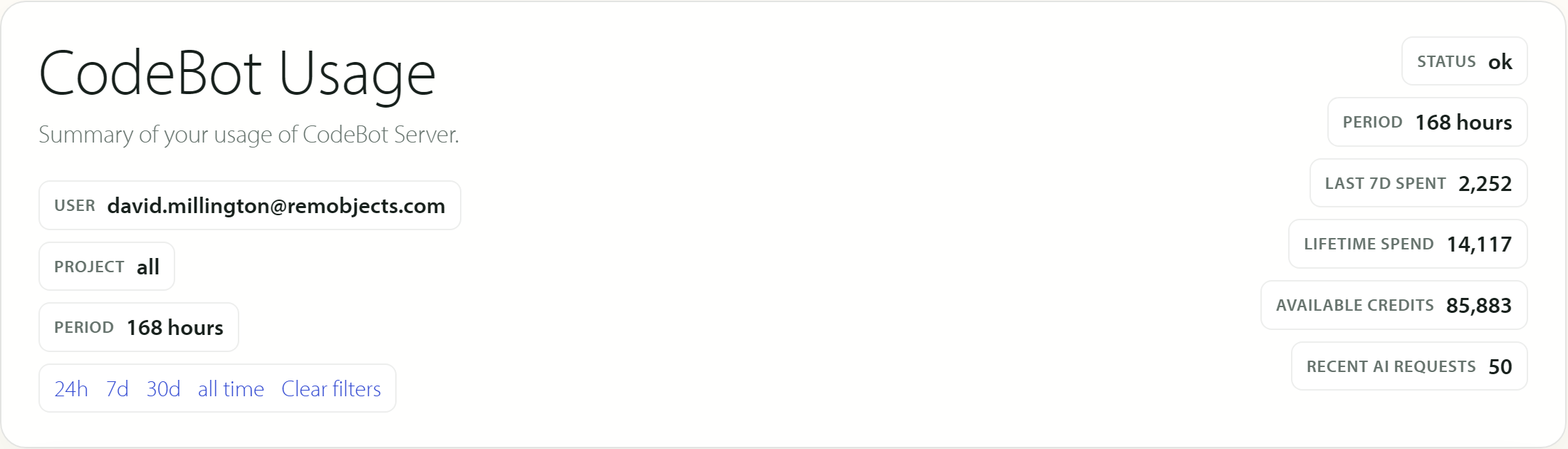
Below that are the following sections:
-
User detail: your account name and projected usage over the next 30 days
-
Credits: lists each purchase of credits, how much, which date, how many have been spent, how many are left.
-
Credits by Model: this lists all models we use, sub-split by reasoning level, and the number of requests made to that model and total cost
-
Credits by Endpoint: very similar, but by endpoint in our API. This is almost always 'message' since CodeBot interaction is by chat.
-
Top Client Request Credits: this lists the most expensive individual requests. It tells you the project (your project file name, eg,
MyProjectforMyProject.dproj) and credit cost. Generally, you may see long-running coding tasks here, since the longer any specific agent runs, over time it uses credits. -
Recent AI Requests: The most recent requests. If you want to see what you have just spent, just now, look at this. It lists the model, project for which is was called, and caller (the internal subagent or task.)
Overall we hope this gives you good visibility into usage. In general, if you're concerned about usage costs, try displaying the past 24 hours and looking at the Credits by Project: this will show you, for each project you've worked on, the usage in the past day. This should give a decent idea of how much CodeBot will cost. Remember, a subscription has an upper limit so you can never over-spend; you will not be charged extra, ever, at any time. You can manually add credits by topping up, though we recommend if you do this often to upgrade your subscription tier.
See Also
- Best Practices
- [Pricing]((https://www.remobjects.com/codebot/pricing.aspx)
- About Credits
- Credits and Top Up
- Models and Architecture